

Invoices and credit notes
Invoice Inn issues two kinds of document. An invoice bills an order, and a credit note refunds part or all of one. When charges are added to an order after it was invoiced, the extra amount gets a second invoice, which the app calls a supplementary invoice; on the Documents page it carries the same “Invoice” badge as the first one. Every document is stored as it was issued. A correction is always a new document, never a rewrite, so the numbering stays unbroken for your accountant.
The Documents page
Section titled “The Documents page”Documents lists every document the app has generated, newest first, under three tabs: All, Invoices and Credit notes. The search box finds documents by customer or order name, and the Document date filter narrows the list to today, yesterday, this month, last month, last year or a custom range.
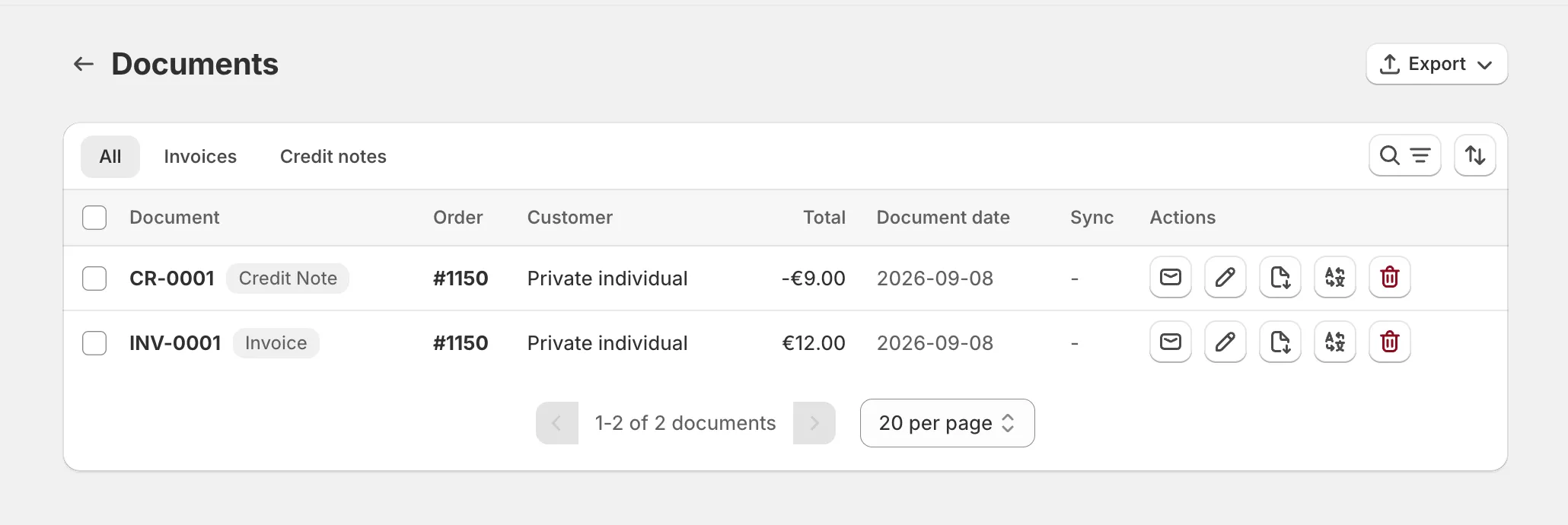
Each row shows the document number with its type badge, the order, the customer, the total, the document date, and which cloud services the file is synced to. Three more badges can appear next to the customer: B2B for a business sale, VAT when the customer’s VAT number was verified, and Sent once the document was emailed to the customer.
The icons at the end of a row are the actions: Send via email, Edit, Download, Download translated and Delete. On the Pro plan and above, a German business also sees Create e-invoice, and Download XML once a document is an e-invoice. See Create e-invoices. Selecting rows adds two bulk actions, Export CSV and Export PDF, and the Export button in the page header has the full exports, including the OSS export for EU VAT returns. Export documents as PDF or CSV covers every download.
Articles in this section
Section titled “Articles in this section”- Edit an invoice after it was issued - what you can change on an issued document, and what needs a credit note instead.
- Change the document date - where the date comes from and how to change it on one document.
- Add a due date to your invoices - print a payment due date from Shopify payment terms or a default number of days.
- Add the date of supply to your invoices - print the date of supply, or delivery date, from the fulfillment, the order or the issue date.
- Add a PO number to your invoices - print the customer’s purchase order number from the order or the order note.
- Show the payment method on invoices - print how the order was paid, such as a card or a bank deposit, under the totals.
- Show totals in your national currency - the net, VAT and total converted at the ECB rate into the currency you file VAT in.
- Show the shipping address on invoices - a second address block with where the order ships to.
- Delete a document - what deleting removes, and what happens to the number and your monthly count.
- Change your invoice numbering - the number format, the tokens it accepts, and resetting the counter.
- What the B2B badge means - which orders count as business sales and what that changes.
- Add a footer note to your documents - bank details, a legal mention or a thank-you line at the bottom of every document.
- Remove the Invoice Inn footer - the branding line on Free plan documents.
- Add your logo - the logo on the document and the one in your emails.
- Translate your documents - the document language, rewriting any label, and downloading a copy in another language.
- Design your invoice - templates, the AI suggestion, layout, colours and fonts, in one overview.