

Add the date of supply to your invoices
An invoice can print the date of supply, also called the delivery date, next to its issue date. It is the day the goods were supplied, and “date of supply” is the term EU VAT rules use. They ask for it when it differs from the issue date. The date of supply is off by default, works on every plan and never appears on credit notes.
Turn on the date of supply
Section titled “Turn on the date of supply”- Open Customize and stay on the Content tab.
- Under Header, tick Display date of supply.
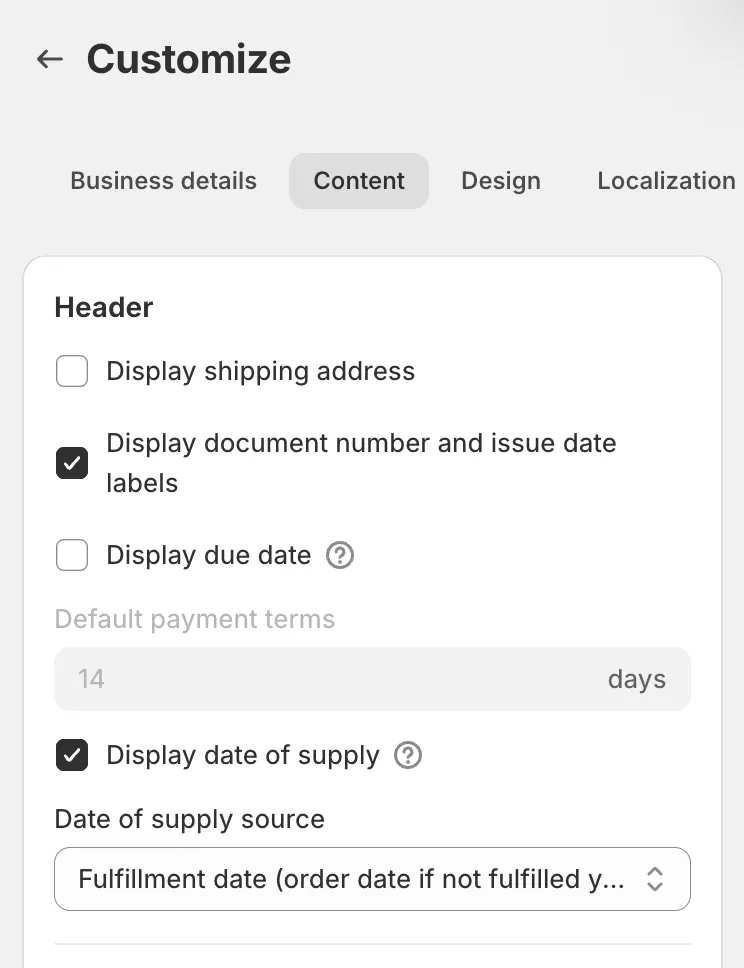
- In Date of supply source, choose where the date comes from. The next section explains the options.
- Click Save. The preview next to the settings shows the date of supply on the sample invoice straight away.
Where the date of supply comes from
Section titled “Where the date of supply comes from”| Date of supply source | Date printed |
|---|---|
| Fulfillment date (order date if not fulfilled yet) | The day the order’s first shipment was marked as fulfilled in Shopify, which is when it was sent, not when the parcel arrived. Cancelled or failed fulfillments are skipped. If nothing had been fulfilled when the invoice was generated, the day the order was placed. This is the default. |
| Order date | The day the order was placed. |
| Same as issue date | The invoice’s own issue date. |
Dates are taken in the Timezone set under Customize > Localization. The date of supply is worked out once, when the invoice is generated, and then stays as it is. Changing the settings afterwards affects future invoices only.
Change the date of supply on one invoice
Section titled “Change the date of supply on one invoice”- Open Documents and click Edit on the invoice’s row.

- Under Document date, fill in the Date of supply field between Date and Due date. Leave it empty to remove the date of supply from that invoice.
- Click Save. The PDF is regenerated with the new date of supply.
The field shows on every invoice while Display date of supply is on, so you can also add a date to an invoice generated before you turned it on. Changing the Date of an invoice does not move its date of supply.
How this shows on your invoice
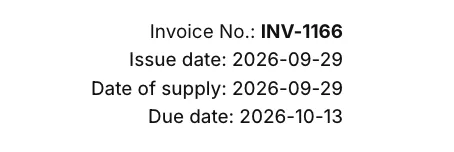
Section titled “How this shows on your invoice”The header prints a Date of supply line under the issue date and above the due date, in the date format chosen under Customize > Localization. The label is printed even when Display document number and issue date labels is off, so the reader can tell the two dates apart. It follows the document language, and you can rewrite it under Customize > Localization in the Translations card, under Titles, as Date of Supply Label.
You can also print the date in the note at the bottom of the invoice with the {{delivery_date}} variable under Customize > Content > Footer > Additional notes. It is filled in on invoices only, and stays empty when the invoice has no date of supply.
Good to know
Section titled “Good to know”- A supplementary invoice, which bills charges added to the order later, takes its own issue date as its date of supply, whatever the source setting. What it bills was supplied when the change was made, not when the order first shipped.
- Credit notes never carry a date of supply, and the Edit dialog of a credit note has no Date of supply field.
- When an order ships in several parts, the fulfillment source uses the first shipment.
- The date of supply is not in the CSV export. It lives on the PDF and in the Edit dialog.