

Collect VAT numbers and apply the reverse charge
A business customer in another EU country can be invoiced without VAT, as long as its VAT number is on the invoice and a legal note explains why. This article covers how the number gets there, and the rule the app follows to decide whether the invoice goes to 0%.
Two ways a VAT number reaches the invoice
Section titled “Two ways a VAT number reaches the invoice”When both are present, a number entered under Edit wins over the one Shopify collected.
- Shopify collects it at checkout. With Shopify’s VAT number collection (the Company VAT number setting) turned on under Settings > Taxes and duties > European Union, the customer enters the number at checkout, Shopify validates it and applies its own EU reverse charge exemption, so the order is charged no tax.

- Editing the document afterwards. Open the document under Documents, choose Edit and fill in VAT ID. The number is checked while you save, and a malformed or rejected number is refused with “Invalid VAT number”. The invoice is regenerated with the new VAT figures and keeps its number, but the legal note is not added on its own: type it into Notes in the same dialog.

On Shopify Plus, a B2B company location with a tax registration ID ranks above Shopify’s checkout collection, but an Edit still overrides it.
Verification against VIES
Section titled “Verification against VIES”Every VAT number is checked against VIES, the EU’s VAT number database. At generation the check runs in the background; a number added under Edit is checked while you save. If you email documents automatically, the B2B customers option Wait for VAT verification, then send under Automations > Email delivery holds the customer’s email until that check has finished, whatever its result.

When the invoice is zero-rated
Section titled “When the invoice is zero-rated”The invoice is treated as a reverse charge sale only if all three hold: the buyer has a VAT number, the buyer and your business are in two different EU countries, and VIES has not rejected the number. Then the outcome depends on what Shopify charged:
- Shopify charged no VAT. The invoice prints every line at 0%, with the legal note. This is the normal case, and what you get when Shopify collected the number itself.
- Shopify charged VAT and your prices include tax. The invoice treats the amount the customer paid as the net amount and prints 0%, with the note. You keep the full amount; nothing is refunded automatically, so if the customer expects the VAT back, that is a refund you make yourself in Shopify.
- Shopify charged VAT and your prices exclude tax. The invoice keeps the VAT as charged, prints the VAT number, and carries no note. The customer paid VAT, so the invoice has to show it.
- VIES rejected the number. VAT as charged, VAT number printed, no note. This only happens with a number that arrived on the order, since Edit refuses a rejected number.
A number rejected after the invoice was generated does not change the invoice. To correct it, open the invoice under Documents > Edit: the VAT figures are recalculated, and the note changes only if you edit Notes yourself.
The legal note
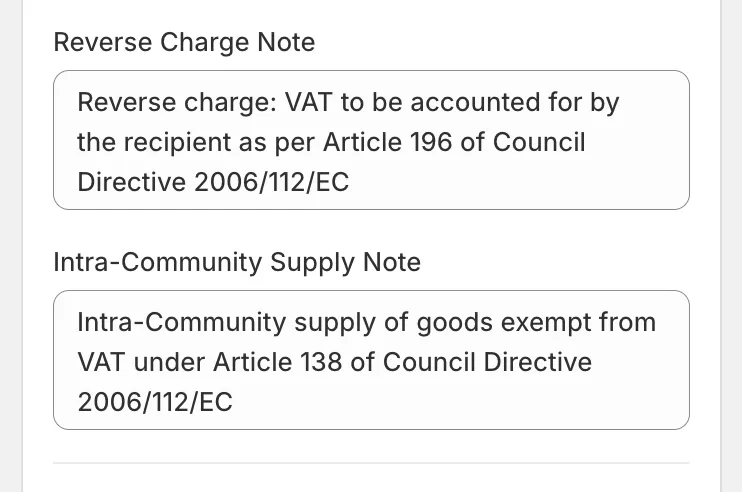
Section titled “The legal note”The note is chosen by what was sold. When any line on the order is a shipped product, the invoice cites the intra-Community supply exemption under Article 138 of the VAT Directive. When the order is services only, it cites the reverse charge under Article 196. Both print in the document language, and you can rewrite the wording under Customize > Localization in the Translations card, under Other.
Credit notes, domestic and non-EU buyers
Section titled “Credit notes, domestic and non-EU buyers”A credit note inherits its invoice’s treatment, so a refund on a zero-rated invoice is a zero-rated credit note with the same note. A VAT number from a buyer in your own country, or outside the EU, is printed on the invoice and changes nothing else: VAT stays as charged and no note is added.
Good to know
Section titled “Good to know”- The OSS export leaves out every document that carries a buyer VAT number, since reverse charge sales are outside OSS.
- A number VIES has verified shows as a green VAT badge next to the blue B2B badge on the document’s row under Documents. The reason behind each tax decision is recorded but not shown anywhere, so check the invoice itself. See What the B2B badge means.