

Delete a document
Deleting a document removes it from the Documents page and from your Google Drive or Dropbox folder, and it cannot be undone. Deleting any document also deletes every document issued after it for the same order, whatever its type, because a credit note or a supplementary invoice cannot exist without the document it corrects.
Delete from the Documents page
Section titled “Delete from the Documents page”- Open Documents and click Delete on the document’s row (the bin icon).

- The dialog is titled with the document number. If the order has later documents, it lists them, each with its number, type, date and amount, and the button reads Delete all followed by the count.
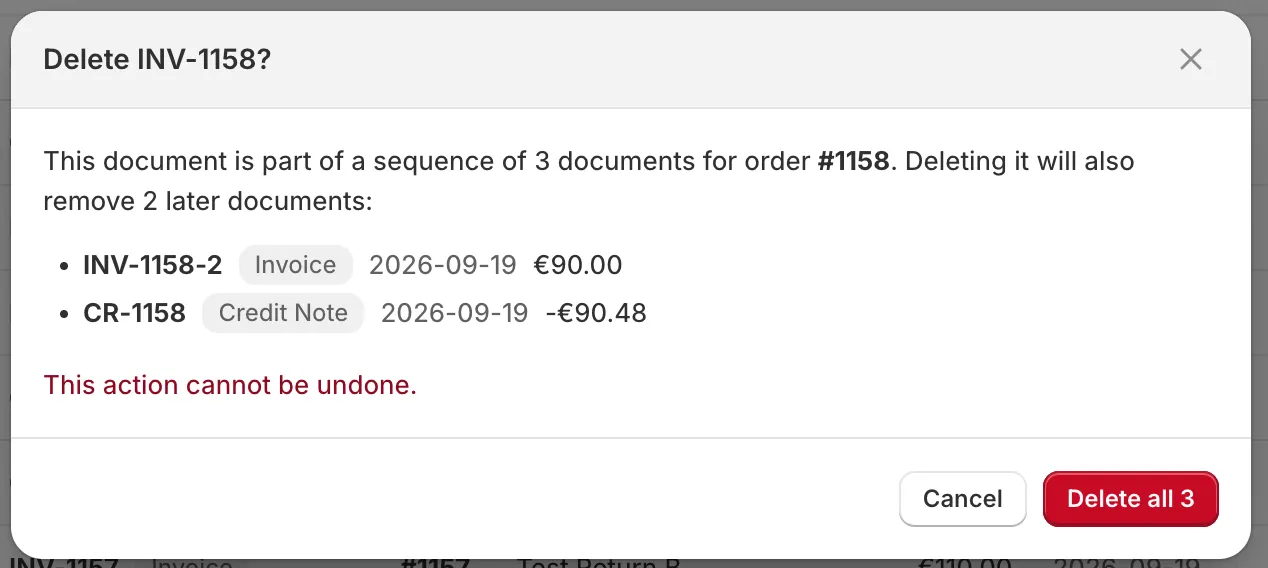
- Click Delete or Delete all. You will see how many documents were deleted.
Delete from the Orders page
Section titled “Delete from the Orders page”On Orders, the menu on an order has Delete documents, which removes every document for that order at once. With several orders selected, the Delete bulk action does the same for each of them.
Good to know
Section titled “Good to know”- The order is not invoiced again automatically. Once all documents of an order are deleted, the app leaves the order alone, even if it is paid or fulfilled later. Create a new invoice yourself from Orders with Create invoice.
- Deleted documents still count toward your monthly document limit. The count covers every document created in the calendar month.
- The number is not reused when your format has a
%or#counter, so a deleted invoice leaves a gap in the sequence. Only a format built on the order number alone, such asINV-{{order_number}}, gives the number to a new document for the same order. - A customer who already received the PDF keeps it. Deleting does not recall an email.
- There is no undo. A deleted document cannot be restored from the app. If you need it back, generate a new one; it gets a new number and today’s date.